jenkins部署相关问题记录
该jenkins实例似乎已离线
安装插件那个页面,就是提示你offline的那个页面,不要动。
然后打开一个新的tab,输入网址 `http://192.168.211.103:8080/jenkins/pluginManager/advanced`。
这里面最底下有个【升级站点】,把其中的链接由https改成http的就好了,http://updates.jenkins.io/update-center.json。
然后在服务列表中关闭jenkins,再tomcat重新启动,这样就能正常联网了
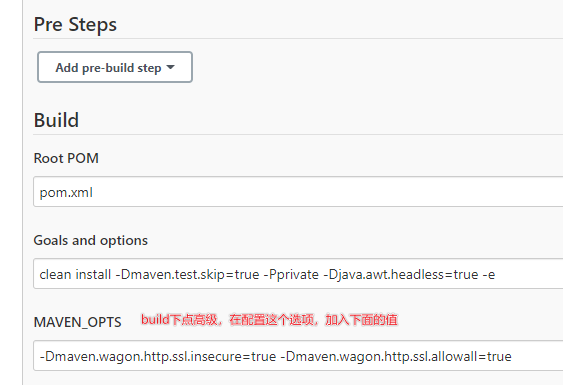
不能下载maven插件依赖
- Could not transfer artifact org.apache.maven.plugins:maven-clean-plugin:pom:2.5 from 这类问题的解决方法
- -Dmaven.wagon.http.ssl.insecure=true -Dmaven.wagon.http.ssl.allowall=true # 在maven_ops中加入该配置即可
- -Dmaven.wagon.http.ssl.insecure=true -Dmaven.wagon.http.ssl.allowall=true -Dmaven.wagon.http.ssl.ignore.validity.dates=true # 未用过
- 参考文章
vue项目,刷新页面后,显示404的问题
- try_files uri/ /index.html; # 用于解决刷新页面后,显示404的问题
- 参考文章
npm镜像源问题
Dockerfile给服务器配置文件追加内容
```shell

echo "FROM tomcat:8.5" > Dockerfile
echo "MAINTAINER Fa" >> Dockerfile
echo "RUN rm -rf /usr/local/tomcat/webapps/*" >> Dockerfile
echo "RUN echo '' >> conf/catalina.properties" >> Dockerfile
echo "RUN echo 'tomcat.util.http.parser.HttpParser.requestTargetAllow=|{}' >> conf/catalina.properties" >> Dockerfile
echo "RUN echo 'org.apache.tomcat.util.buf.UDecoder.ALLOW_ENCODED_SLASH=true' >> conf/catalina.properties" >> Dockerfile
echo "ADD ./target/*.war /usr/local/tomcat/webapps/" >> Dockerfile
echo "EXPOSE 8080" >> Dockerfile
# echo 'ENTRYPOINT ["/usr/local/tomcat/bin/catalina.sh","run"]' >> Dockerfile

docker build -t docker-test .

```
Java相关问题
-
异常:org.springframework.web.util.NestedServletException: Handler dispatch failed; nested exception is java.lang.NoClassDefFoundError: Could not initialize class sun.font.SunFontManager
- 启动java时加上参数:-Djava.awt.headless=true
- 参考文章
-
异常:找不到文件/opt/java/openjdk/lib/libfontmanager.so
- 11-jre-alpine的docker镜像中找不到这个文件,所以去除-alpine,直接使用11-jre即可